

The network that sends prescriptions to you.
Udok is building South Africa's largest connected cash healthcare network for uninsured and cash-paying patients — and pharmacies sit at the centre of it. Get listed, receive electronic prescriptions, and facilitate consultations from your clinic.
Free to join. Non-binding. A member of the Udok team sets you up.
Udok Pharmacy Portal
Secure e-prescriptionsReceive electronic prescriptions.
Prescriptions arrive in your secure Pharmacy Portal the moment a patient directs them to you.
Record every dispensing decision.
Decline what you cannot fulfil, record partial dispensing, and mark scripts fully dispensed.
Close the loop with the doctor.
Treating doctors see dispensing status — continuity of care without the phone calls.
One connected network. Already at scale.
Our doctor network covers 11 of South Africa's 12 official languages, and the Udok Express queue averages a response of about one minute.
Prescriptions directed to you. Dispensing on your terms.
Joining puts your pharmacy in front of the network's patients and gives your pharmacists a secure portal built for how dispensing actually works.
01. Benefit
Be found by patients.
Your pharmacy is listed on the Udok website and in the patient app, so patients across the network can direct their prescriptions straight to you.
02. Benefit
A secure Pharmacy Portal.
Authorised pharmacists receive electronic prescriptions through secure Udok Pharmacy Portal logins — decline scripts you cannot fulfil, record partial dispensing, and mark scripts fully dispensed.
03. Benefit
Visibility for treating doctors.
Every dispensing update gives the treating doctor visibility of what was dispensed, supporting continuity of care and medication adherence.
04. Benefit
Less waste. Better care.
Shared dispensing visibility across the network reduces duplicate dispensing and pharmacy-hopping — better for patients, better for your dispensary.
The flow
Life of a prescription.
Follow a prescription from signing to delivery, pharmacy claim, and dispensing. Check its signature separately from its Udok claim status.
01. Step
Doctor signs once.
The practitioner signs the prescription in Udok. Advanced Electronic Signature (AES) signing is available to practitioners with an activated and connected certificate from an SAAA-accredited provider. The PDF carries a QR for checking its Udok claim status.
02. Step
Patient sends — or carries.
The patient emails the prescription to any number of pharmacies through Udok, downloads it, or emails it to themselves.
03. Step
Pharmacy claims.
Open the secure link or scan the QR, log in to the Pharmacy Portal, and confirm the claim. The first claim wins — enforced by a database guarantee, not a phone call.
04. Step
The original is endorsed.
A platform-signed stamp — “Transferred as original to your pharmacy” — is applied. Every other copy’s link shows where the original is held.
05. Step
Dispense and close the loop.
Your pharmacist records partial or full dispensing per item, and the treating doctor sees it on the consultation.
Why this is legally sound
The regulations want exactly this.
Reg 33, Medicines Act General Regulations.
Pharmacists must verify prescription authenticity before dispensing (reg 33(4)). Udok supports Advanced Electronic Signatures (AES) for prescription signing. The QR links to the Udok claim record; it does not establish that a prescription carries a valid AES.
SAPC guidance.
The SAPC names the exact problem — can a pharmacist be sure a prescription sent to the patient’s WhatsApp or email has not been presented to another pharmacy already? — and recommends direct prescriber-to-pharmacy transmission as the norm. Udok’s claim ledger answers the question with a database guarantee instead of a phone call.
Good Pharmacy Practice.
GPP judges an e-script’s integrity as complete and unaltered “except for the addition of any endorsement” — endorsements are an anticipated, recognised act. Udok’s is applied as a PDF incremental update signed by a Udok platform certificate, preserving the original signed content of an AES-signed prescription and making the endorsement itself verifiable.
Turn your clinic into a virtual consulting room.
Udok provides free assisted-access profiles for authorised nurses and clinic staff. Your staff help patients register or access their profiles, pick a doctor or join Udok Express, and start a private virtual consultation right from the clinic.
Any prescription issued after the consultation can be directed straight to your pharmacy — the patient consults, collects, and pays without leaving your store.
Patients stay in control of their profiles, consent, doctor selection, and payment. Payments go through Udok.

A kiosk for your clinic consults.
We are equipping partner clinics with consultation kiosks so patients can start a virtual consultation on site — no patient hardware, no setup. Interested? Tell us in the interest form and the Udok team will take it from there.
I'm interested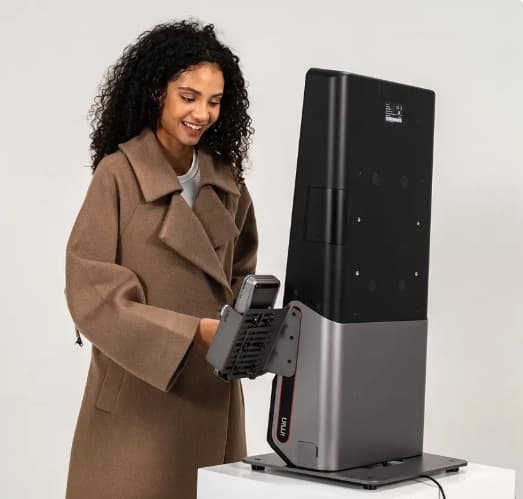
A network that keeps patients coming back.
The network connects care end to end — from how patients pay, to how doctors prescribe and test, to how patients look after themselves between visits.
Prepaid healthcare vouchers.
Patients buy prepaid healthcare vouchers through Shoprite, Checkers, Medirite, the MoneyMarket app, and 1Voucher — and spend them on care in the network.
Electronic prescriptions, delivered securely.
Receive prescriptions through the Udok Pharmacy Portal, with support for Advanced Electronic Signatures (AES) issued through an SAAA-accredited provider.
Digital labs and results.
Doctors send digital lab requests and receive electronic results across 100 laboratory depots — the clinical loop stays connected.
Udok Healthbot.
Patients get general health screening and supplementation guidance from the Udok Healthbot, keeping them engaged with their own care.
Joining is simple.
Three steps between your pharmacy and the network — and the Udok team does the heavy lifting.
Register.
Complete the short form below. It is free and non-binding — a member of the Udok team will contact you.
We set you up.
Udok creates your listing, assisted-access profiles, and portal login credentials. We will need your location, contact info, trading hours, services, registration details, and authorised users.
Start receiving scripts.
Receive prescriptions, record dispensing, and facilitate consultations from your clinic — with onboarding support from the Udok team.
Register interest
Put your pharmacy on the network.
Tell us where to find you and who to talk to. That is all we need to start — we'll take it from there.
Registering is free and non-binding — Udok reviews your pharmacy and sets everything up.
We create your listing, assisted-access profiles, and secure Pharmacy Portal logins.
You start receiving electronic prescriptions and facilitating clinic consultations.
Prefer email? Reach the team at [email protected].
Questions pharmacies commonly ask.
What does it cost to join the Udok pharmacy network?
Registering is free and non-binding. Udok reviews your registration; once approved, your listing and Pharmacy Portal login are created and your sign-in details are emailed to your pharmacy.
What information do we need to provide to join?
To create your listing, assisted-access profiles, and login credentials, Udok will need your pharmacy’s location, contact information, trading hours, services, registration details, and the authorised users who need portal access.
How do prescriptions reach our pharmacy?
Patients direct their prescriptions to your pharmacy through the Udok website and patient app. Authorised pharmacists receive electronic prescriptions through secure Udok Pharmacy Portal logins, can decline scripts they cannot fulfil, record partial dispensing, and mark scripts fully dispensed.
Does every prescription carry an Advanced Electronic Signature (AES)?
No. Udok supports AES prescription signing through an SAAA-accredited provider, but the signature depends on the practitioner’s configured signing mode. After an eligible signing failure, the practitioner may explicitly choose a saved signature image for that prescription. An image-signed prescription does not carry AES. Check the prescription’s signature and authenticity separately from its Udok claim status before dispensing.
Can our pharmacy clinic offer virtual consultations?
Yes. Udok provides free assisted-access profiles for authorised nurses and clinic staff. Staff help patients register or access their profiles, pick a doctor or join Udok Express, and start a private virtual consultation from the clinic. Any prescription issued after the consultation can be directed to your pharmacy.
How do patients pay for consultations?
Patients stay in control of their profiles, consent, doctor selection, and payment. Payments go through Udok and support cards, Pay by Bank, Capitec Pay, Apple Pay, Google Pay, Samsung Pay, Payflex, Scan to Pay, 1Voucher, and medical aid.
Have a question that is not here? Email the team. We will get back to you within one working day.

Patients are already on the network. Be the pharmacy they choose.
Register today — free, non-binding, and set up for you by the Udok team.